If this license is in use within your organisation, be prepared for changes at your next renewal. It’s still showing on pricelists as it will be available to existing customers until their next renewal but if you haven’t bought any already, you’ve missed your chance.
Sticking with licenses will mean a move to Power Apps Premium, which will be a price increase.
Alternatively, you can move to Power Apps Pay As You Go (PAYG) which is going to be Microsoft’s preference as they want as many customers on consumption billing as possible.
SQL Server 2025 has been released and, while the licensing model remains the same, there are few changes worthy of note:
Developer now comes in “Standard” and “Enterprise” versions.
SQL Server Standard max compute capacity per instance increased from 24 to 32 cores
SQL Server Standard max buffer memory increased from 128GB to 256GB
SQL Server Express now supports a 50GB database size
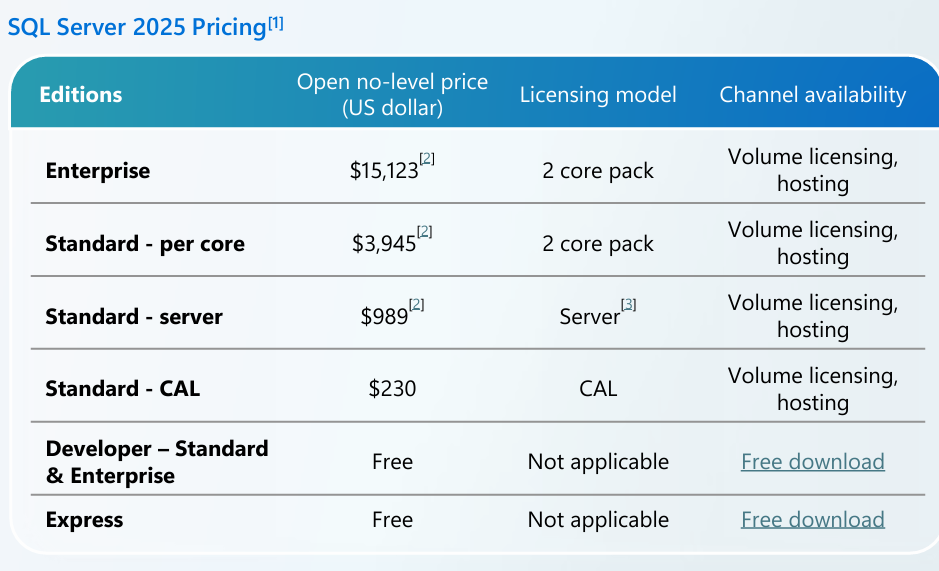
The first will help with a common problem. With just a single Developer product, it contained all the features of both SQL Server Standard and Enterprise; often I see scenarios where a product/system was inadvertently created with a dependency on an Enterprise feature…hugely increasing the required licensing costs. As you can see, the price difference between Standard and Enterprise is significant:
That price difference is also why the changes to maximums for compute capacity and memory are important. The increased allowances may mean that some SQL Server Enterprise scenarios within your environment could be migrate to Standard edition with a 2025 upgrade. If it’s a 32 core setup, that’s a $176,000 reduction.
Finally, the increased database size for SQL Server 2025 Express may increase its viability for production scenarios – although it retains the single CPU limit.
Another change is that SSRS (SQL Server Reporting Services) is now replaced with PBIRS (Power BI Reporting Services).
PBIRS is available to customers with SQL Server 2025 Standard and Enterprise but for prior versions, PBIRS is SQL Enterprise only and only with active SA.
Microsoft have announced the Agent Pre-Purchase Plan (P3) – a new unified offer that covers both Copilot Studio and Microsoft Foundry services with one pool of credits.
How is the Agent Pre-Purchase Plan priced?
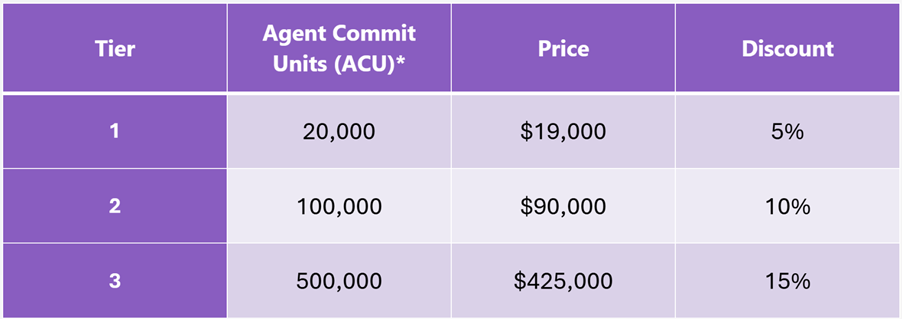
This annual commitment has 3 pricing tiers:
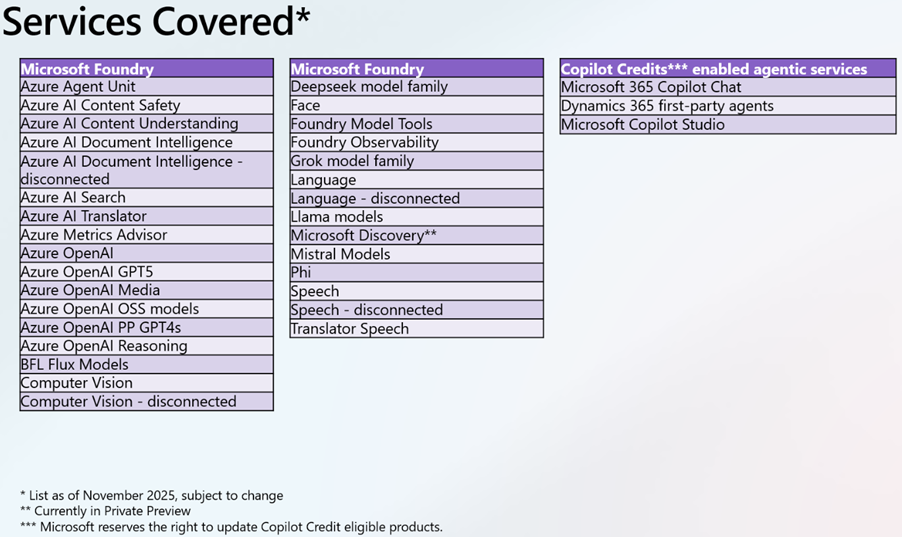
And covers a range of services:
Note the asterisks as always – some things are in preview and all are subject to change.
My big question is whether this offer sits alongside the recently announced “Copilot Credit Pre-Purchase Plan (P3)” or if it replaces it after just 3 weeks?! They seem slightly different but also very similar…
Microsoft Security Copilot uses Security Compute Units (SCU) to measure the compute power used to run various workloads. A quantity of these is now available with Microsoft 365 E5 licenses, rollout starting from November 18th 2025..
What SCU capacity is included with Microsoft 365 E5 licenses?
Each Microsoft 365 E5 license includes 0.4 SCU so, for example, an organisation with 1,000 M365 E5 licenses will have 400 SCU per month. The allocation resets monthly and unused SCU cannot be rolled over to the next month.
There is a maximum limit of 10,000 included SCU per month – this is equivalent to 25,000 M365 E5 licenses.
Pricing considerations
Should organisations exceed their M365 E5 included SCU quantity, overage SCU will be available for $6 per SCU on a Pay As You Go (PAYG) basis. That is 50% higher than the “Provisioned” SCU pricing of $4.
However, an interesting point – and something that adds complexity to these decisions – is that the included SCU provide more flexible billing than the traditional provisioned capacity model.
Under provisioned capacity, an organisation commits to a set number of SCU per hour and is charged for that amount even if actual usage is lower. With E5, the included SCU are drawn down only by the amount actually consumed each hour, which provides a more accurate reflection of usage and avoids paying for unused capacity:
With Provisioned Capacity, if you provision 5 SCU but only use 3.5 – tough, you pay for all 5.
With E5 Included, you would only use 3.5 SCU.
This addition is another move to keep organisations on M365 E5, rather than stepping down to E3 +add-on.
It’s been rumoured for a while that Microsoft would release a new product/license for AI Agents called Agent 365 and we have the first public acknowledgement of this from Redmond.
Microsoft 365 Message MC1183300 is titled “Microsoft Teams and Microsoft 365 Copilot: Discover and create agentic users from Teams and M365 Agent Store” and gives us some initial information.
Starting in mid-November 2025, we will get “AI-powered Agentic Users” that will have “full organisation identities”. Users will be able to request agent templates but, at least for now, admins will control the creation and licensing.
What are AI Agents?
Microsoft differentiate them from bots and say:
Agentic Users are provisioned as full-fledged user objects with their own:
· identity in the organization’s directory (via Entra ID or Azure AD)
· email addresses
· Teams accounts
· presence in the org chart
They can participate in meetings, send and receive emails and chats, access and act upon enterprise data, and learn from interactions to improve over time. They have the ability to “proactively reason and act without explicit instructions”.
Some Azure AI terms added around “the use of First-Party Consumption services and the use of Web Knowledge Sources while using Grounding with Bing services”.
Microsoft 365 E3 added as the prerequisite for Microsoft eDiscovery Graph API Standard
Terms added following the recent updates around Teams:
“This Notice applies to customers in the European Economic Area (EEA) who purchase through Microsoft’s commercial licensing programs with a billing account that is in the EEA.
Such customers have the right to purchase (no Teams) Suites (and those in multi-year agreements may switch to (no Teams) Suites at their next annual order) at a price below the price of the corresponding Covered Suites. Customers are also eligible to receive the same percentage discount (whether negotiated or offered as a promotion and whether implemented as a price reduction or as a rebate) on the (no Teams) Suites that is offered on the corresponding Covered Suites. These (no Teams) Suites may be used with competitors to Teams if the customer purchases a competing solution.
Rebranded Microsoft 365 E5 Security (and all relevant offers) to Microsoft Defender Suite Rebranded Microsoft E5 Compliance (and all relevant offers) to Microsoft Purview Suite
M365 E5 Security = Microsoft Defender Suite M365 E5 Compliance = Microsoft Purview Suite
M365 F5 Security = Microsoft Defender Suite FLW M365 F5 Compliance = Microsoft Purview Suite FLW
There is also a “Defender + Purview Suite FLW” SKU
FLW = FrontLine Worker
As always, there’s going to be a period of time where the names differ between pages, sites, documents etc. so be prepared…especially for renewals.
2) Removed Microsoft Defender Threat Intelligence from Availability and Prerequisite Tables
3) Azure Firmware Analysis and Azure IoT Operations connectors added
Visual Studio Subscriptions have been added to MCA
Windows 10 ESU added to CSP
Microsoft Defender & Microsoft Purview Suites have now been made available to Business Premium users
That last point is very interesting as this brings a world of new security features to smaller organisations – which will have multiple impacts:
1) directly increase the ARPU (Average Revenue Per User) of SMB customers as they buy new add-ons 2) increase the chances of SMB customers adopting Copilot – as these new products address many of the security/data challenges… 2b) which will further increase the ARPU of SMB customers
Microsoft have long been calling out the strength of SMB driving M365 sales so this is a logical next step.
With the upcoming release of SQL Server 2025, there will not be a new version of SQL Server Reporting Services (SSRS). Instead, Power BI Report Server will be the default – offering new features including PBIX reports, data modelling, and custom visuals.
The Microsoft announcement states that “when SQL Server 2025 becomes generally available, any customer with a paid SQL Server license will have access to Power BI Report Server (PBRS) ” while PBRS was previously limited to Enterprise edition customers with Software Assurance.
Power BI Report Server (PBIRS) installation requires keys from SQL Server 2025 and later versions. For SQL Server 2022 (16.x) and previous versions, access to PBIRS is limited to customers with SQL Server Enterprise edition and Software Assurance (SA), who can use a PBIRS key provided by Microsoft.
You don’t have to transition immediately if you don’t want to as SQL Server Reporting Services (SSRS) 2022 will continue to receive security updates and support through January 11, 2033.
The announcement (with other SQL 2025 info) is here and there is more info here too.










 Cloudy with a chance of Licensing