More focus on Microsoft VLSC problems


The Microsoft VLSC website has been suffering issues for a month now (as this post chronicles) but it has been hard to get anyone to pay much attention to it. Now however, Bill Snyder over at Infoworld has written an article about the issues which will hopefully get us closer to getting a response from Microsoft. Check the article out here:

http://infoworld.com/t/cloud-computing/microsoft-snafu-calls-question-its-cloud-reliability-513

As you can see from the title, Bill makes some good points about Microsoft’s reliability as a Cloud Service provider. These are points that I’ve been thinking more and more recently and I do feel there’s something here that needs to be addressed by Microsoft.

Let me know what you think of the article…

Microsoft Office Web Apps


Microsoft’s Office Web Apps have garnered a lot of interest recently as a new way of interacting with Office, and as a competitive move against Google Docs. Despite me having had the Tech Preview of Office for a while (and indeed, I installed the beta tonight), I’ve just got Web Apps in my Windows Live SkyDrive…so let’s take a look 🙂

I now have a button entitled “New”:

image

Excel Workbook:

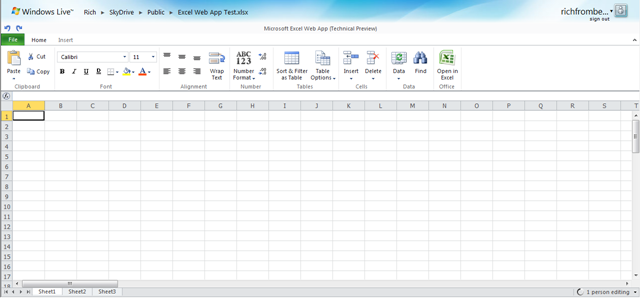
After giving the workbook a name, you’re presented with what is easily recognisable as an Excel Workbook:

image

You can see that most of the ribbons tabs are missing, here we have just “Home” and “Insert”, but I can do pretty much everything I generally need to do in Excel. Admittedly I’m nowhere near a Power User but I think I’m probably a typical user..

FAQs:

Can I do Sums? Yes:

image

Can I drag a formula down into other cells? No

Can I create Charts? No

Can I change font size, colour and type? Yes

Can I insert tables? Yes

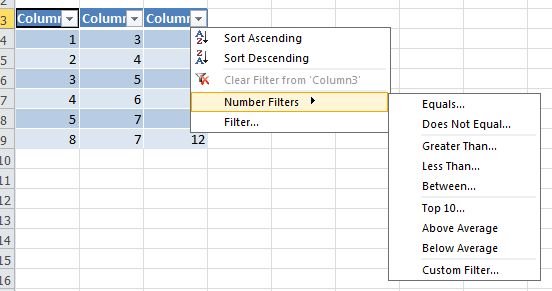
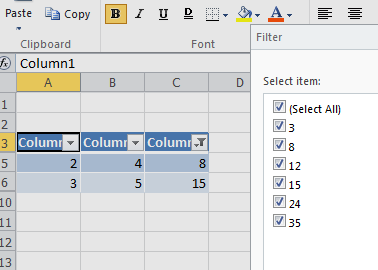
Can I do filters? Yes, if you insert the data into a table:

image

image

Can I paste into Excel Web Apps from other programs? Yes

The “File” menu has some extra options too:

image

Word:

Word Web App isn’t available yet:

image

Powerpoint:

Powerpoint Online is similar to Excel, in that it is cut down but contains all the basic features you’re likely to need:

image

image image

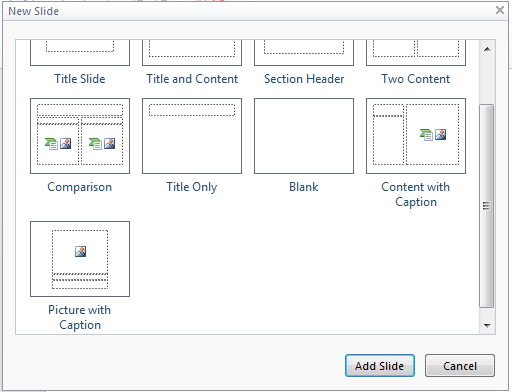
You get a choice of different types of slide when you add a new one:

image

Something I wasn’t expecting is a great choice of Smart Art:

image image

That’s pretty impressive 🙂

The Slideshow works perfectly well but it opens up in a new browser window, so it gets stopped by pop-up blockers.

The big thing that’s missing is Transitions though…maybe they’ll be coming soon…

OneNote:

Same as Word, OneNote isn’t available yet:

image

Microsoft Professional Developers Conference (PDC) 2009 Day 1


Today was the first day of Microsoft’s PDC with a keynote from Ray Ozzie & Bob Muglia and, as you’d expect from “The Ozmeister” (as I’m now calling him!), the “Cloud” featured pretty heavily in the form of Windows Azure.

Windows Azure Launch Date: Windows Azure will officially launch 01/01/10 (January 1st 2010) and, as a little sweetener, the 1st month will be free 🙂

WordPress runs on Windows Azure: This is pretty cool – who knew?!

Oddly Specific runs on Windows Azure: From the creator of “I Can Haz Cheezburger?” comes a new site “Oddly Specific”. Funny AND runs on Windows Azure.

Back off, grabby mcgee.

Microsoft Project Dallas: This is an “information and brokerage service” designed to allow access to commercial and reference data from people such as:

  • Associated Press
  • NASA
  • National Geographic
  • UN

and more.

The aim is to create Data As A Service (DAAS) and let data become a commodity…this could be huge!

Microsoft Project Sydney: This will enable you to connect existing in-house/on-premise services with those running in the cloud on Azure. This is a huge leap forward for Azure becoming an integral part of corporate environments.

Microsoft AppFabric: Windows Server AppFabric is:

“set of integrated technologies that make it easier to build, scale and manage web and composite applications that run on IIS”

It has 3 main parts to it which are:

  • Caching
  • Workflow Management
  • Service Management

What was once known as “Dublin” is now makes it easier to build/manage services using Windows Workflow Foundation & Windows Communication Foundation.

Another codename that’s been wrapped into AppFabric is “Velocity”. I haven’t heard of this before but it provide caching capabilities to

“provide high-speed access, scale, and high availability to application data”

You can see more info and some AppFabric samples here:

http://msdn.microsoft.com/en-gb/windowsserver/ee695849.aspx

These are the main points I’ve picked up today from Twitter using the hashtag #PDC09 as I’m not in L.A myself 😦 As more details become available, I’ll update this/do some new posts.

Also, tomorrow’s keynote is going to include talk of Internet Explorer 9 (that’s right NINE!) so I’ll be covering that ASAP… 🙂

Microsoft BPOS: Sharepoint Online 2010


Sharepoint 2010 is due for release around April time 2010 and the Online version will become available through BPOS around September time I do believe.

When the 2010 version of Sharepoint (and Exchange & OCS) hit online, they will be SO much more fully features than the current 2007 versions; they will in fact be almost the same! This will be especially notable with Sharepoint as their is a large disparity at the moment:

Read Comparison of Sharepoint Server & Sharepoint Online

Sharepoint Online 2010 will include all the Business Intelligence (BI) aspects such as:

  • Excel Services
  • Forms Server
  • Dashboards
  • Key Performance Indicators (KPI’s)

and more 🙂 As a BPOS Partner this is great news…the BI features are becoming more interesting to more people and not having these features can be quite a big barrier to Sharepoint Online adoption. That’ll all change next year which is great news 🙂

Licensing

Wave 14 will bring some changes to the BPOS licensing too…there will be Standard and Enterprise USLS…just as there are for the on-premise CALs.

However, the split of features between the 2 will be decidedly different. The Enterprise CAL will include:

FAST Enterprise Search

There are also rumblings that it will include some part of, or ways of linking to, Microsoft’s Data Warehousing technology “Project Madison”. This would certainly fit with the BI capabilities inside Sharepoint…

I’ll be doing a post dedicated to Madison soon so keep your eyes peeled for that 🙂

This is all great news, for partners, customers and Redmond as, come H2 of 2010, Sharepoint Online will be a formidable challenger in the world of S+S/SAAS BI and should be pretty great. I, for one, am excited 🙂

Props to W Cornwill for the Britney pic!

Microsoft “Geneva”: Single Sign On & Online Services


Microsoft Geneva:

“provides companies with simplified user access and single sign-on, for on-premises and cloud-based applications in the enterprise, across organizations, and on the Web to facilitate collaboration, increase security and reduce cost.”


There are 3 components to Geneva which now have more official names:

Geneva Framework = Windows Identity Foundation: provides developers pre-built .NET security logic for building claims-aware applications

Geneva Server = Active Directory Federation Services (ADFS) 2.0: a security token service (STS) for issuing and transforming claims, enabling federations, and managing user access

Geneva Cardspace = Windows Cardspace: helps users navigate access decisions

The aim of Geneva is to provide a true “Single Sign On” (SSO) experience to users across the various platforms that they come across, be they corporate and/or personal.

For example, once a user is logged in with their corporate domain credentials they could then access Microsoft Online Services such as Hotmail, MSDN, LiveSpaces etc; without being prompted to enter their @hotmail/@live credentials. All this requires is 1 Geneva Server and a Windows Live Tool currently called “Microsoft Online Services Federation Utility”.

Federation Gateway

The Microsoft Federation Gateway is a cloud based identity service, that extends beyond your corporate domain out into the internet. This is the hub for all the connections users want to make to external MS technologies, be it Azure, Live or BPOS (MS use CRM Online as an example on the MSDN site).

Cc287610.405c867e-b9fe-4933-8ca1-7387ae678041(en-us,MSDN.10).gif

The above shows the federation of identities between partners. An example of how the data flows between the different points of the SSO setup can be seen below:

Cc287610.83e88583-1e36-4e3c-8cfd-51a1a312b9a0(en-us,MSDN.10).gif

You can find more information about the Microsoft Federation Gateway on MSDN here.

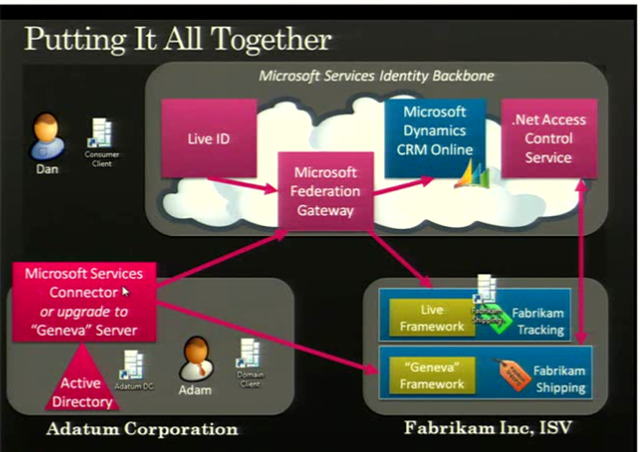
A slide from PDC 2008 showed an example of Geneva working with a BPOS component for the US:

image

The full 1hour+ video of the “Identity Roadmap for Software + Services” presentation video from PDC 2008 can be viewed here on Channel 9.

I know that BPOS, Microsoft’s hosted offerings of Exchange & Sharepoint (among others) will start using ADFS 2.0 at some stage next year. Most likely when the 2010 versions are deployed to the cloud, which I expect to be around late calendar Q3 so August/September. This is where I’m particularly keen to see what Geneva can do for SSO…it should make it pretty much seamless for corporate users whether they’re accessing on-site applications such as Exchange, their Online brethren, custom developed applications, hotmail, MSDN and more…and that will be excellent!

I use a variety of different MS Online Services and have at least 3 different logins for them…I’ll be interested to see if Geneva can look after that for me 🙂 BPOS currently comes with a separate SSO client which needs to be installed for each user and comes with it’s own unique set of issues, so having a corporate wide SSO would definitely be better. Also, you currently need to re-enter your details for OWA with BPOS as it’s on an HTTPS connection…I assume Geneva would remove that need?

Some great technical documents, step-by-step guides and Virtual Machine demos of Geneva can be found on the Technet site here.

Microsoft BPOS Updates for November


Microsoft are constantly improving BPOS and adding new features each month, and November is no different.

Mailbox Access Permissions

Powershell commandlets are being added to increase the range of mailbox permission settings that can be done by BPOS administrators including:

  • Full Mailbox Access
  • Delegate Send As
  • Send On Behalf

These provide capabilities including:

“up shared mailboxes, granting “send as” permissions for administrative assistants, and enabling full mailbox access for third party applications, such as archiving applications and fax servers”

No more opening a ticket with support!

The CMDlets are:

Add Mail Permission

Remove Mail Permission

These will require an update to the Transporter/Migration tools which will be downloadable from MS Download Centre once the update is deployed across all datacenters; this should be completed by early December.

Bulk User Management

A new set of CMDlets for bulk adding and removing users have been added too. These will also rely on the updated Transporter tool being made available. The CMDlets are:

Sharepoint Auditing

Admins will soon be able to view data and reports on site collection activities including:

  • items added
  • changes to permissions
  • documents viewed

Having access to this information can help track the utilisation of the Sharepoint investment within the company and so will be very useful. Companies will be able to see how users are interacting with the system and identify any areas that need improving or conversely, which areas are a roaring success 🙂

Partners on Invoices

Customers who use a Partner of Record will soon see that partner named on their invoices. From a Partner’s point of view, this is a great addition as it helps solidify the relationship between the Partner and the customer and reduces any confusion as to points of contact for support etc.

Once again, the updates have given BPOS an even stronger message and this, coupled with this week’s price cuts, should definitely see an increase in BPOS takeup.

The full MS Online blog post is here.

Microsoft BPOS Price drop


Microsoft BPOS (Business Productivity Online Suite) has been available in the US for over a year, the UK for 6-7 months and is appearing in more and more countries all the time.

It offers online versions of:

  • Exchange
  • Sharepoint
  • Live Meeting
  • Office Communications

and has been seeing great success in all areas. Today Microsoft have announced something that will surely lead to even greater adoption…a price cut 🙂

Pricing was previously:

  • Exchange = £6.69
  • Sharepoint = £4.85
  • Live Meeting = £3.01
  • Office Communications = £1.67
  • BPOS Suite = £10.04
  • it is now:

  • Exchange = £3.35
  • Sharepoint = £3.51
  • Live Meeting = £3.01
  • Office Communications = £1.34
  • BPOS Suite = £6.69
  • All pricing is per user per month.

    The suite which includes all the online products above is now the same price as Exchange on it’s own!

    While BPOS has always represented great value for money, price is often a big consideration for customers…especially in these times of economic recalibration. I believe that these price cuts will really drive an upsurge in BPOS adoption…which is good for everyone!

    You can download the announcement document here.

    MS BPOS Connectivity Test


    The Microsoft Online (BPOS) team have released an excellent tool, which measures the upload/download speeds of your connection to show how it would fare with using BPOS services.

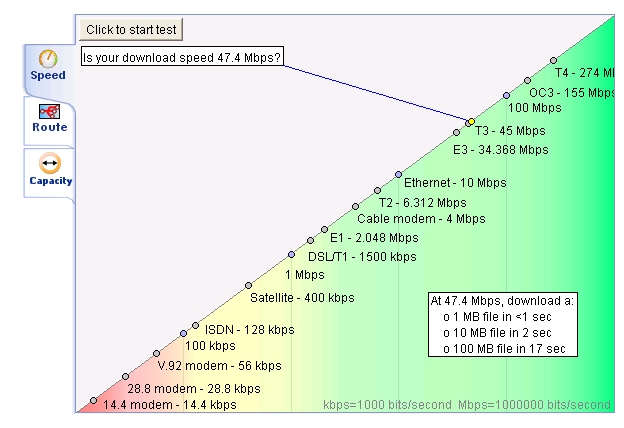
    This tests the speed of your connection:

    image

    This looks at the routes:

    image

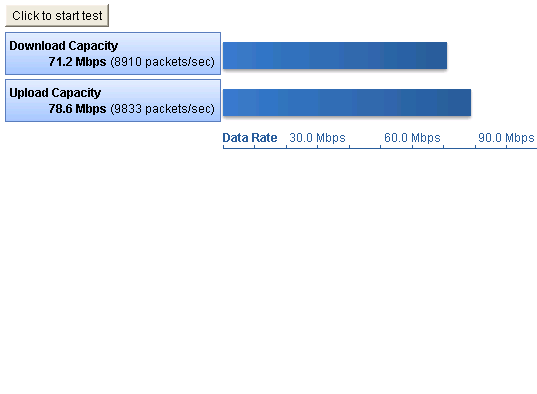
    This analyses the capacity:

    image

    Details:

    This tool helps you understand the quality of the Internet connection between your environment and Microsoft Online Services. It does not measure your environment compatibility with Microsoft Online Services. The tool performs three tests:

    • Speed: This test measures your actual download and upload speeds, quality of data, and TCP efficiency. It uses TCP/20000 for download testing and TCP/20001 for upload testing.
    • Route: This test validates your connection quality, including packet loss, latency, round trip, and ISP peering points. It uses Internet Control Message Protocol (ICMP).
    • Capacity: This test measures your potential maximum download and upload speeds. It uses UDP/8090.


    Thoughts:

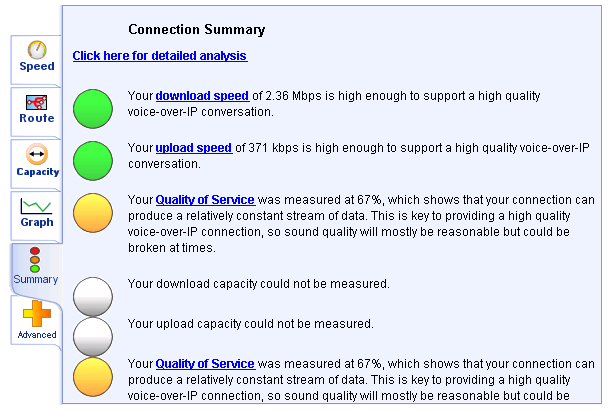
    Potentially this is going to be very useful when speaking to customers about BPOS, as one of the big worries that many people have is there connection not being good enough. They worry that suddenly throwing all their internal email, as well as Sharepoint uploads/downloads could be too much for their existing networks; this could be an easy way of showing exactly what it can and can’t handle. The reason I say “potentially” and “could” is this:

    image

    The results seem to be aimed solely at VOIP traffic for using Office Communications Online (OCO). However, it still shows them that their bandwidth etc is, so it’s definitely useful but it would be nice if it had a separate answer for each of the products.

    That said, the above does point towards something else…currently OCO only contains the Presence and Instant Message (IM) features. I’ve heard on the grapevine that VOIP calls will be coming to OCO but this is the first definite sign that this is underway 🙂

    Being able to use Office Comms Online for Voice calls will be a huge selling point for customers as the on-site version (Office Communications Server (OCS)) can be quite tricky to install and get running correctly. Normally I’d guess we’ll see this in the US first and not here for a while but the URL for this tool is:

    http://speedtest.emea.microsoftonline.com/

    Note the EMEA (Europe, Middle East & Africa) part…looks like we’ll be getting it pretty soon too…I’ll see what further info I can find out from MS 😉

    As Paul from Worktivity points out in the comments, if you’re outside of EMEA the links you need are:

    For the APAC region: http://speedtest.apac.microsoftonline.com/
    For America’s region: http://speedtest.microsoftonline.com/

    Thanks to @worktivity who’s tweet alerted me to this…

    Importing Journaled data into Exchange Online


    I was asked a great question via the comments on my blog, which was:

    “Can BPOS accept journal data that has been exported from an existing Exchange system?”

    With some help from the great people in the Worldwide BPOS teams at Microsoft I have an answer…and that answer is YES 🙂 It is possible to import already journaled data into Exchange Online, meaning you can easily move from Exchange Onsite to Exchange Online.

    How to do it:

    1. There are a few caveats to this process:Data must be in .PST format only. Alternative file format types such as MIME, EML, MSG, or Lotus Notes are not accepted.
    2. You must submit historical data files on an external hard drive or USB memory stick.

    This one is a little bit odd-I assume the reason you can’t transfer the data online is due to the sheer volume of data that may well be in question and so “sneakernetting” it would be quicker; but couldn’t DVD’s be used? I suppose that an External HD would mean the data could all be read in without any human intervention along the way, while a bunch of DVD’s would require someone to insert/eject them? (Feel free to add your thoughts).

    You need to create a “mapping” file which for Exchange 2000, 2003 & 2007 can be done via:

    1.Start a command prompt. (Click Start, click Run, type Cmd, and then click OK.)
    2. At the command prompt, type or copy and paste the following and press enter:
    C:\> csvde -l “mail,legacyExchangeDN” -r “(objectClass=user)” -f customer_name-map-file.csv

    For Exchange 5.5:

    1. Open the Microsoft® Exchange Server 5.5 administrative program and choose the option for a tools-directory export.
    Historical Data File Format and Submission Procedures Microsoft Exchange Server
    4
    2. There will be an option to choose mailboxes, custom recipients, and distribution lists (select all).
    3. Select the export file option and choose a destination for the file you are about to create. The file that is exported will be in a CSV format.
    Please remember to include this file with your historical data. The file should be named: customer_name-map-file.csv

    Once you have all that it’s loaded onto your External drive/USB stick, you need to package it up and physically mail it off to Microsoft with the following details:

    Bulk Data Services Group

    Attn: Betti Johnson (Ticket Number)

    Alias: bettijo

    3720 159th Ave NE

    Redmond, WA 98052

    Ph. 1 (425) 703-3237

    I am checking to see if there is a separate address for EMEA (and indeed other regions) and also how much this service costs, as the pdf datasheet hints at a charge. *Update* I’ve just been told that the charge is $50 per GB (one time fee) for the import and that you must send the data to the US.

    The datasheet can be found here.

    Exchange Online SMTP Enabled


    It’s now possible to serve SMTP clients via Exchange Online-meaning you can have mail originating outside the online environment. I’ve had a few people ask me about this and the use has always been so that automated applications can send mail via Exchange Online…such as an SQL server auto sending a report etc.

    To connect the SMTP client to Exchange Online you’ll need to give it the Fully Qualified Domain Name (FQDN) which will be:

    • North America: Smtp.mail.microsoftonline.com
    • Europe: Smtp.mail.emea.microsoftonline.com
    • Asia Pacific: Smtp.mail.apac.microsoftonline.com

    You’ll also need to use Port 587 and TLS (Transport Layer Security).

    Full info can be found over at the Technet BPOSitive blog.

    Yet another great new feature that serves to make Exchange Online and BPOS a great choice for companies of all kinds & sizes…