
What a great picture of the Millennium Centre in Cardiff, Wales. Nice work Bing!

Cloudy with a chance of Licensing
Latest news on Microsoft licensing, Cloud, and AI
What a great picture of the Millennium Centre in Cardiff, Wales. Nice work Bing!
Google Goggles is here. No, not the Google Labs project from 2008 that Gmail would check your sobriety levels using maths puzzles before letting you send an email (see Telegraph here)…but true Visual Search. That’s searching with pictures as in:
“What’s that a statue of?”
“Dunno mate”
“Tell you what, I’ll take a picture of it on my phone and Goggle it”
“*snap*…*upload*…*search"*…”
“Oh…it’s Winston Churchill”
“What, the dog off of the adverts bruv?”
”Dunno…seems a bit big innit?”
That conversation went a bit “chavvy” there…funny but probably not representative of the demographic that will mainly be using this 🙂
If my awesome transcript above isn’t enough, Google have some examples over at:
http://www.google.com/mobile/goggles/#landmark

Google are quite upfront that it “works better with certain types of queries”. They say that
“books & DVDs, landmarks, logos, contact info, artwork, businesses, products, barcodes, or text”
all work well while it’s not currently hot on “animals, plants, cars, furniture, or apparel”.
Only if you’ve got an Android 1.6+ device 😦

This might be the first time that users of Windows Mobile devices, Blackberries & iPhones have all come together in a show of solidarity usually reserved for invading aliens in hollywood movies 😉
Actually yes, yes there are!
This shows you local businesses such as restaurants, cinemas etc WITHOUT EVEN CONDUCTING A SEARCH! Point your camera forwards in Goggles mode, pan around and, once the GPS locks on and:
“you’ll see labels tagged to the nearby businesses, and a pin icon with a number in it at the bottom right corner of the screen. The number in the icon indicates the number of businesses nearby. You can either click the pin to see all places near you listed by proximity, or select a specific label to see more information about that particular business.”
Some nice augmented reality!
I’ve never really been a fan of Google. I always used Google Search because, until Bing came along, it was the best but I was never interested in Google Mail or Google Apps. While things such as Google Earth and Streetview have come in very handy, I’ve never felt any connection with Google as a company; I don’t know them, they don’t know me and neither of us case about the other.
When they brought out Android, I was took a look but wasn’t bothered and the same goes for Chrome and Chrome OS. I’m a staunch Microsoft supporter, have been for many years and will continue to be so…BUT…
Google Goggles really could be awesome. For years I’ve said this should be the next evolution in search (ask anyone that sits near me at work!) and here it is…I feel a bit like the people in the Windows 7 adverts 😉
The number of times each day that people can see something but don’t know what it’s called:
“What kind of car is that?”
“Who’s that a statue of?”
“Which company has this logo?”
“What’s this building called?”
and there’s just no way to describe it to a text search engine, must be in the 100’s if not 1000’s.
It’s like Shazam for everything that isn’t music!
I’m a big fan of Windows Mobile (for all it’s faults) and I really believe that Windows Mobile 7 will be a HUGE leap forward. I’m due an upgrade to my phone very soon and have got my eye on the HTC HD2 with Windows Mobile 6.5…but this announcement has really made me consider jumping ship to Android…at least until WinMo 7 is released!

Having said all that though…my main thought is this:
”Will I ACTUALLY use it that much?”
As in, will I use it enough to make up for not having Office Mobile, for learning a new OS etc…and I’m not sure I will.
What I really want is for this to become available on normal, everyday desktop…no actually, what I REALLY is for this feature to come to Bing’s normal, everyday desktop search…that would be the best case scenario 🙂
I’m never sure how copyright/patents come into play with things like this…can Google patent this and stop Microsoft from developing essentially the same thing for Windows Mobile and Bing?
All in all, this is a great advance in the world of search and a good show from Google that they’re still in the game…but not enough to turn this user.
Bing Twitter search is live!
Over the last few weeks, we’ve seen rumours that Twitter would be licensing data to Bing and Google, earlier today it was announced that Bing had definitely signed it up…and now it’s all up and working…for the US at least.
Head over to www.bing,com/twitter and change your location to United States (top right hand corner)…this will allow you to search live Twitter data…and it’s pretty cool. I did a search for myself (of course!) and got:

There you can see how I found out to change the location (cheers JNathan!) and some other tweets sent to me…you can also see at the bottom a tweet from me with a “top link” in it.
You’ll also notice that each tweet has a small “RT” icon, allowing you to Re-tweet it on Twitter…that’s a pretty nice feature!
Today sees another great addition that makes Bing an even stronger competitor to Google, and that is Visual Search.
This gives you search results as images (which has been shown to speed up searches by around 20%), rather than just a list of text. You can then filter and re-arrange the image results based on various criteria. It’s still in Beta at the moment but it has quite a few “featured galleries” that give you an idea of how it works and it’s all based on Silverlight. Here’s an example:
Say you’re searching for a certain celeb but you can’t remember their name. Got to the “Popular Celebrities” gallery:

You know it’s a female singer you’re thinking of so using the filters on the left, you can tighten in up:
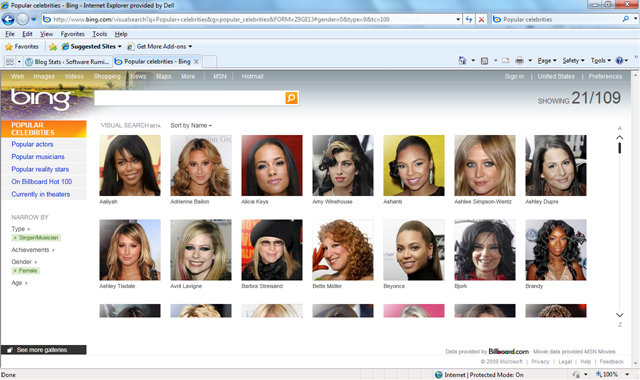
That’s cut it down from 915 to 109 but that’s still quite a few pictures to go through; luckily there’s one filter that I think is particularly awesome…the age range filter. The singer you’re thinking of is somewhere in here 30’s so:

Here (if you open up the bigger picture) you’ll see the age is set to 29-41, which has further narrowed it down to 31, which is an easy amount of pics to quickly flick through. Once you’ve found the person you’re looking for, simply click the image to be taken to a Bing search page for them:

Even in it’s Beta form, this is clearly a powerful new tool in Microsoft’s assault on the world of search and it can only get better. What’ll be great is when you can get the Visual Search results for any query so next time someone’s arguing that it’s Laurence Fishburne in 187, not Samuel L Jackson-you can Bing it and get Visual Proof-nice 😉
Well done Microsoft…now here’s my request for the next version of Visual Search…the ability to generate a search query with a picture. Say you’ve got a JPEG of a building/person/car and you just don’t know what or who it is, imagine being able to upload that to Bing and it identifying it for you…that’s be pretty sweet 🙂
If you can’t access the page www.bing.com/visualsearch then change your country to the US (in the top right corner) and you should be all good!
I got my invitation to the Office 201 Technical Preview the other day and, quite excitedly, started to install it on my laptop but after about 10 minutes it failed and stated that the previous version of Office (2007) couldn’t be upgraded. I had a look on Twitter and couldn’t see anyone else with the issue so I figured it was specific to my machine, and I was right! My next move was to uninstall the existing Office 2007 and go for a clean install but oh no, “the uninstall has failed”…”WHAT?!”…I was now in the unenviable position of being unable to remove or upgrade Office 2007.
I got Office 2010 installed alongside 2007 but it wasn’t ideal as I could only have 1 copy of Outlook (2007) and having 2 versions of Office takes up a fair amount of room etc so I wasn’t massively happy about it. I did a quick Bing (yes-I Bing everything now!) and found the following Knowledge Base article:
This covered the very topic I was having (which proved it wasn’t just me!) and gave step by step instructions on how to get Office 2007 removed from my machine. If you’re having the same issue I won’t bother repeating the steps here but I do have a couple of points to add:
1) This isn’t a quick process-it took about 2 hours of manually deleting files and registry entries.
2) Point 2 of Step 5 (the Uninstall Registry key) didn’t exist on my machine but that didn’t cause any problems.
3) Some of the steps involve deleting folders from your hard drive and while most of these were fine, at least one refused to go down without a fight! I got the somewhat common problem of being told I “don’t have permission to delete the folder”, even though I was the admin on my machine. This threw a spanner in the works so back to Bing it was…and it came up trumps again 🙂
Over on petri.co.il there is a post on how to add a “Take Ownership” option to the right click menu in Vista, through creating a quick registry file. The details are there to be pasted into the file, it’s easy to do and it definitely works, the post is here:
http://www.petri.co.il/add-take-ownership-context-menu-vista.htm
With the KB article and the above addin-you should have all you need to sort out your Office installation and be in a position to re-install a properly working edition…I hope this helps and good luck 🙂
Bing, Microsoft’s new search engine has been with us for about 1.5 weeks and is still getting the great reviews it was receiving initially. This article over on The Register contains proof that Bing is actually better than Google…at least when it comes to adverts.
While we, as users, need search engines to give us relevant results easily and quickly; they, as businesses, need them to make money…and when it comes to search engines, that’s all about the adverts baby! A research specialist company called User Centric have been conducting tests based on where users of Bing and Google look when online:
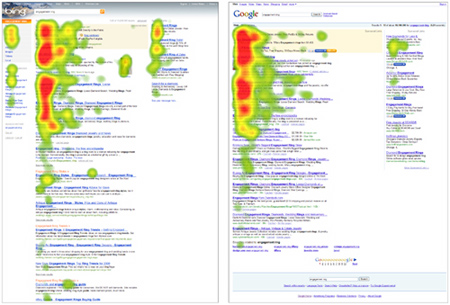
It seems the “vertical search and Bing-optimized categories, combined with the way Bing presents the search results on the screen” are the key here. Microsoft are sure to be happy that their latest venture is proving successful in pretty much every possible way 🙂
On a personla note-I think Bing is awesone 😉
To coincide with the release of the awesome Bing decision engine, Microsoft have made 3 bing-themed ringtones, or Bingtones, available.
Go grab them here and see what you think 🙂 I’m a little worried to say that I quite like Bingtone 2!
Thanks to Pocket PC Thoughts.
Microsoft Bing went live this morning; I’ve been playing around with it and I’m very impressed!
The first thing I did was search for my blog and I noticed the new thing to the side of the results which, when hovered over, gives you a preview of the site like so:

I’m also very impressed with the image search-it seems to bring back better results than Google and the “Related” links on the left always seem to be relevant.
The next thing that impressed me, and made me change my homepage over to www.bing.com (from Google) was the relevance of search results, especially when compared to Live Search. For some reason, I can never remember the URL for Mary Jo Foley’s All About Microsoft blog so previously,I would Google it and simply click the top result. However, when I tried using Live Search, the top results were all various articles rather than the main homepage-and that made it a couple of clicks longer than with Google. Not much difference I know, but in these hectic 21st century days-it all counts 😉 Now though-I can Bing it and it’s the top result-happy days!
I am a big fan of Microsoft (as you might have gathered) and I always wanted to use Live Search, but it just wasn’t good enough…now that Bing is here though, I think we’ll see Redmond’s market share jump up quite a bit. They’ve definitely got at least one new user…
 Cloudy with a chance of Licensing