BPOS 2010 aka Wave 14


BPOS (Business Productivity Online Suite), Microsoft’s Online Services offering has been somewhat successful over the last year or so, but it is about to become a much more robust platform. Over the next few months the “Wave 14” rollout will begin, with an aim to being completed by the end of 2010.

The biggest update is that the products will match the versions that are available to purchase “on-site”. That is, BPOS will offer Exchange 2010 and Sharepoint 2010 with near feature parity; removing one of the biggest hurdles to BPOS adoption…at least in my experience.

However, there are a number of other additions and improvements coming…

Identity and authentication has been an issue for many people, as this whole area is quite clunky & “un-modern”. As Program Manager Dan Kershaw says:

“the password policy isn’t configurable, you can’t use the same credentials used inside the company for single sign-on with BPOS so admins have to maintain separate credentials, there’s no two-factor authentication and no role-based administration”.

The fact that Microsoft recognise these limitations is great as that means they’re also working on fixes. The update will bring:

  • Password Policy controls
  • Five admin roles
  • Federated ID’s w/ 2 factor authentication for single sign-on
  • New Admin Console
  • Service connector for managing Pcs & apps.


Powershell is definitely the way forward for 21st century system admins and, while it can be used for certain things with the current iteration of BPOS, more is coming soon.

I covered off some of the new features of Sharepoint Online 2010 in this post but now there is more information on what’s coming for Office Communications Online (OCO) over the next year.

Currently OCO gives IM and presence, along with peer to peer video, only within the customer’s domain. One of it’s biggest limitations is the inability to “federate” with on-premise OCS servers…this slightly puzzling block will be removed with Wave 14.

It’s said there will be “full integration” with Exchange & Sharepoint, both on-site and online.

This will lead to:

  • using the calendars on Exchange/Sharepoint to determine someone’s IM availability
  • voicemail in Exchange Online
  • IM functionality in OWA 2010.

One of the biggest questions people have is whether Office Comms Online will have VOIP/Voice capabilities.

"it might be more than a year later," says Ziv Fass, Senior Product Manager in the OCS team "but it won’t be years".

From a reseller AND a customer point of view, the updated versions of Microsoft’s Online Services will be a real benefit to us all.

Microsoft “Geneva”: Single Sign On & Online Services


Microsoft Geneva:

“provides companies with simplified user access and single sign-on, for on-premises and cloud-based applications in the enterprise, across organizations, and on the Web to facilitate collaboration, increase security and reduce cost.”


There are 3 components to Geneva which now have more official names:

Geneva Framework = Windows Identity Foundation: provides developers pre-built .NET security logic for building claims-aware applications

Geneva Server = Active Directory Federation Services (ADFS) 2.0: a security token service (STS) for issuing and transforming claims, enabling federations, and managing user access

Geneva Cardspace = Windows Cardspace: helps users navigate access decisions

The aim of Geneva is to provide a true “Single Sign On” (SSO) experience to users across the various platforms that they come across, be they corporate and/or personal.

For example, once a user is logged in with their corporate domain credentials they could then access Microsoft Online Services such as Hotmail, MSDN, LiveSpaces etc; without being prompted to enter their @hotmail/@live credentials. All this requires is 1 Geneva Server and a Windows Live Tool currently called “Microsoft Online Services Federation Utility”.

Federation Gateway

The Microsoft Federation Gateway is a cloud based identity service, that extends beyond your corporate domain out into the internet. This is the hub for all the connections users want to make to external MS technologies, be it Azure, Live or BPOS (MS use CRM Online as an example on the MSDN site).

Cc287610.405c867e-b9fe-4933-8ca1-7387ae678041(en-us,MSDN.10).gif

The above shows the federation of identities between partners. An example of how the data flows between the different points of the SSO setup can be seen below:

Cc287610.83e88583-1e36-4e3c-8cfd-51a1a312b9a0(en-us,MSDN.10).gif

You can find more information about the Microsoft Federation Gateway on MSDN here.

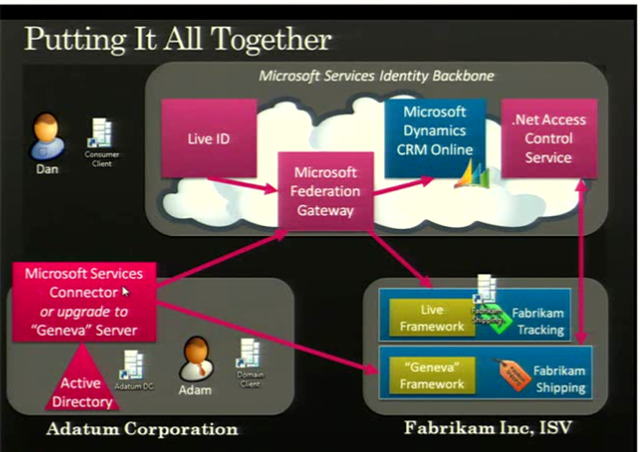
A slide from PDC 2008 showed an example of Geneva working with a BPOS component for the US:

image

The full 1hour+ video of the “Identity Roadmap for Software + Services” presentation video from PDC 2008 can be viewed here on Channel 9.

I know that BPOS, Microsoft’s hosted offerings of Exchange & Sharepoint (among others) will start using ADFS 2.0 at some stage next year. Most likely when the 2010 versions are deployed to the cloud, which I expect to be around late calendar Q3 so August/September. This is where I’m particularly keen to see what Geneva can do for SSO…it should make it pretty much seamless for corporate users whether they’re accessing on-site applications such as Exchange, their Online brethren, custom developed applications, hotmail, MSDN and more…and that will be excellent!

I use a variety of different MS Online Services and have at least 3 different logins for them…I’ll be interested to see if Geneva can look after that for me 🙂 BPOS currently comes with a separate SSO client which needs to be installed for each user and comes with it’s own unique set of issues, so having a corporate wide SSO would definitely be better. Also, you currently need to re-enter your details for OWA with BPOS as it’s on an HTTPS connection…I assume Geneva would remove that need?

Some great technical documents, step-by-step guides and Virtual Machine demos of Geneva can be found on the Technet site here.