A new addition to the July 2023 Product Terms is Microsoft Dev Box. This is an Azure services that provides pre-configured, project-specific virtual workstations for developers.
Licensing
Dev Box must be used “to design, develop, or test applications” and users need to be licensed with:
Windows 10/11 Enterprise
Intune
Azure Active Directory P1/P2 (now Entra ID)
These can be licensed individually or as part of:
Microsoft 365 F3/E3/G3/E5/G5/A3/A5/Business Premium
Microsoft prohibit using “the service to perform server functions to devices outside of the service or to third parties” and also “for sustained distributed computing or digital asset transaction validation workloads“.
The “Azure Customer Solution” clause in the Azure General Terms:
“Customer may create and maintain a Customer Solution. Despite anything to the contrary in Customer’s licensing agreement, Customer may permit third parties to access and use the Microsoft Azure Services solely in connection with the use of that Customer Solution.”
does not apply.
Pricing
Where there will be high ongoing usage, the Max Monthly Price makes sense but for shorter/more variable scenarios, the Hourly Compute price will likely be more effective.
The storage cost is paid each month until the Dev Box is deleted, so make sure to keep an eye on old, unused instances as that can soon start to add up across a large organisation!
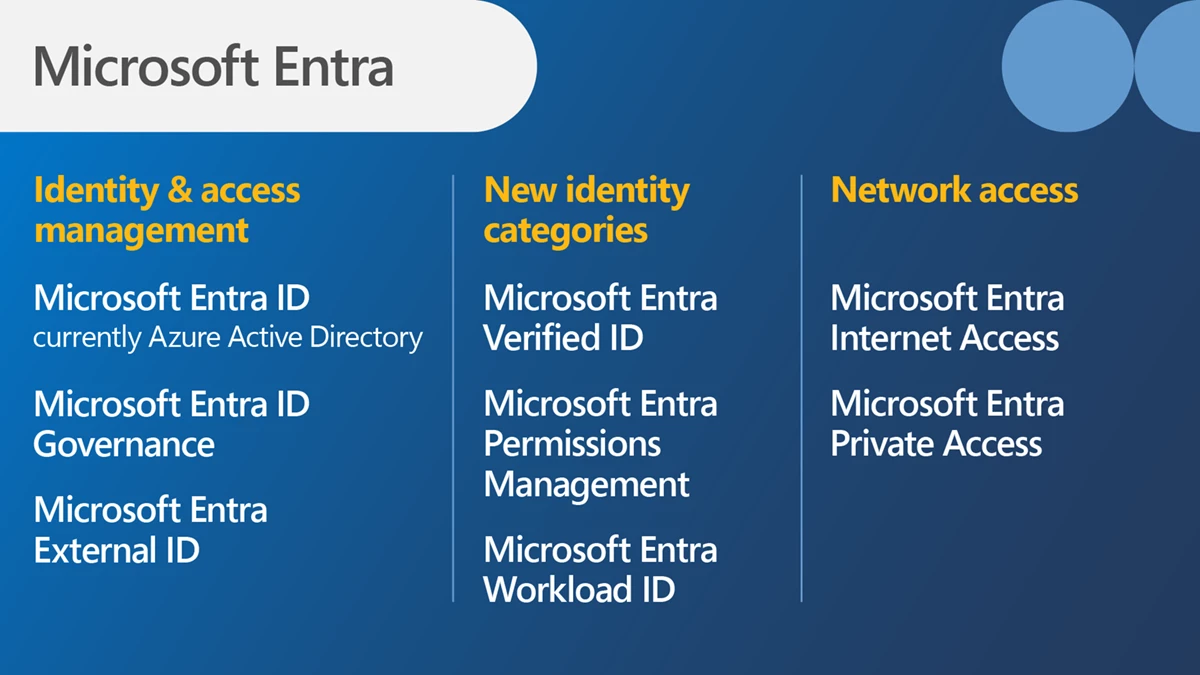
Microsoft have added 2 new products to their Entra family:
Microsoft Entra Internet Access
Microsoft Entra Private Access
Both are focused on security and protecting access to apps over the internet.
Microsoft Entra Internet Access
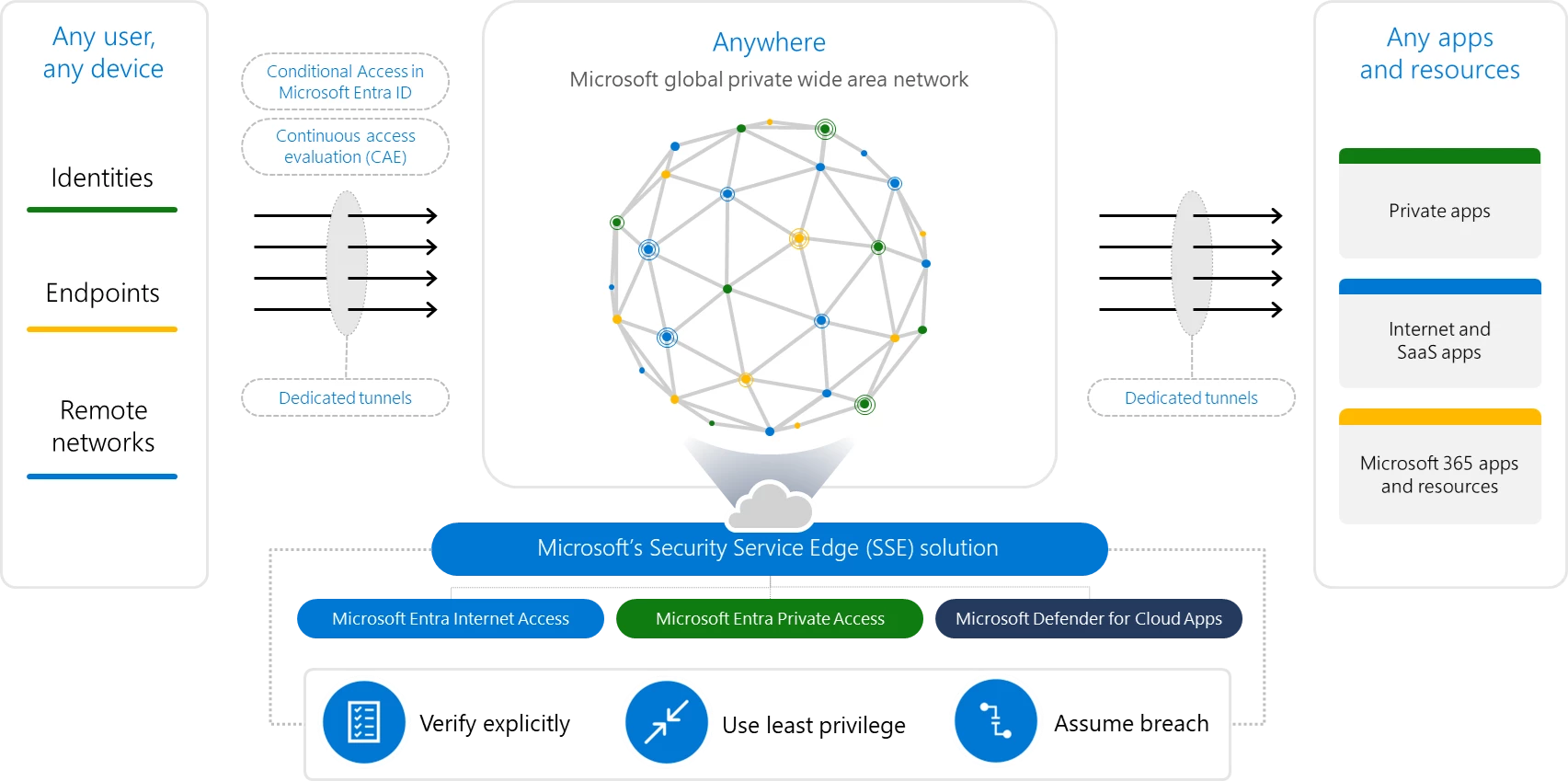
An identity-centric Secure Web Gateway that protects access to internet, SaaS, and Microsoft 365 apps and resources. It extends Conditional Access policies with network conditions to protect against malicious internet traffic and other threats from the open internet.
Microsoft Entra Private Access
An identity-centric Zero Trust Network Access that secures access to private apps and resources. It reduces operational complexity and cost by replacing legacy VPNs and offers more granular security. You can apply Conditional Access to individual applications, and enforce multifactor authentication, device compliance, and other controls to any legacy application without changing those applications
These 2 products, plus Defender for Cloud Apps, form what Microsoft call their Security Service Edge (SSE) solution:
Microsoft Build 2023 saw the announcement of Microsoft Fabric – “an end-to-end, unified analytics platform that brings together all the data and analytics tools that organizations need” by combining various products including Power BI, Azure Synapse Analytics, and Azure Data Factory.
Additionally, “Fabric comes with a SaaS, multi-cloud data lake called OneLake that is built-in and automatically available to every Fabric tenant. All Fabric workloads are automatically wired into OneLake, just like all Microsoft 365 applications are wired into OneDrive. “
To get more info about what Fabric is, check out the MS post here. To learn more about the licensing and pricing, read on 😊
Microsoft Fabric licensing
Microsoft Fabric takes its licensing model, and some of its terminology, from Power BI Premium which means parts of this may be familiar to you.
Each organisation must have 1 x “organisational” license and at least 1 x “individual” license and each subscription is broken down into tenants, capacities, and workspaces.
Organisational licenses
These provide the infrastructure for Microsoft Fabric – effectively this is what gets things provisioned in Azure so you have something to access/work with. There are 2 types which follow the Power BI Premium pattern:
Capacity – This provisions a set of resources in Azure with different SKUS providing different amounts of capacity, cores, RAM etc.
Premium Per User – Gives per-user access to Power BI elements on Microsoft Fabric, with shared capacity only.
Capacity SKUs
SKU
Capacity Units
PAYG (Hourly)
PAYG (Monthly)
Power BI SKUs
Power BI v-cores
F2*
2
$0.36
$262.80
N/A
0.25
F4*
4
$0.72
$525.60
N/A
0.5
F8*
8
$1.44
$1,051.20
EM1/A1
1
F16*
16
$2.88
$2,102.40
EM2/A2
2
F32*
32
$5.76
$4,204.80
EM3/A3
4
F64
64
$11.52
$8,409.60
P1/A4
8
F128
128
$23.04
$16,819.20
P2/A5
16
F256
256
$46.08
$33,638.40
P3/A6
32
F512
512
$92.16
$67,276.80
P4/A7
64
F1024
1024
$184.32
$134,553.60
P5/A8
128
F2048
2048
$368.64
$269,107.20
N/A
256
Pricing of Fabric capacity SKUs at US west 2
*SKUs smaller than F64 require all users, including those consuming content, to be licensed with a Power BI Pro license.
The Azure “F” SKUs are billed PAYG per second
The P SKUs are billed monthly/annually with a monthly commitment and support Fabric being enabled on top of the Power BI subscription.
The EM SKUs do not support Fabric.
Individual licenses
Free – This allows users with access to Fabric capacity to create and share Fabric content
Pro – Required to create, share, and in some cases consume, Power BI content
This appears to show a differentiation between “Fabric content” and “Power BI content” – even if the Power BI content is being created within Fabric 🤔
Pricing and costs
As well as the SKU pricing above, there will also be additional costs for OneLake storage. Again based on costs in US West, the price is:
$0.023 per GB per month
That equals $23 per TB per month ($276 annually). 500TB of data in Fabric OneLake will be $138,000 per year and I feel like that’s probably a low amount of data for many organisations.
There are also potential bandwidth costs as data is accessed and moved between regions:
Managing these resources and costs can be done through a combination of the Fabric portal and Azure Cost Management:
Furthermore, Azure Reservations (Reserved Instances) are planned for later in 2023 which will make the Fabric capacity pricing comparable to the Power BI capacity pricing.





 Cloudy with a chance of Licensing