Microsoft Project gets a refresh


Photo by Pixabay on Pexels.com

Microsoft are making changes to the “Project experience” to make it easier to use. They say this new Project is “designed to be both simple and powerful, so anyone can get started quickly and take control of any project right away”, with a more intuitive user interface – certainly something Project could do with in my opinion! Not surprisingly, there’s a fair amount of integration with Teams and Power BI.

As part of this, there are new/changed product names too. Project Online Professional is now Project Plan 3, while Project Online Premium is Project Plan 5. Added to the lineup is Project Plan 1 – an entry level SKU which doesn’t include many of the features nor a desktop client. It’ll be interesting to see what, if anything, Plan 1 means for the future of Planner.

Project Plan 1 features – https://products.office.com/en-gb/project/compare-microsoft-project-management-software

You can see Microsoft’s announcement here, and check out the features and pricing for the Project Plans here.

Microsoft retiring Invoicing and Customer Manager


Photo by Mikhail Nilov on Pexels.com

Microsoft have announced that they’re retiring 2 of their SMB focused products included in certain Office 365 flavours: Microsoft Invoicing and Microsoft Customer Manager. They’ve not indicated why but one would assume it’s due to a lack of customer interest.

According to a statement given to Mary Jo Foley of ZDnet, Microsoft have been offering affected customers special deals with “Invoice2Go” and “Nimble” to help them transition to their replacement services.

SQL Server 2019 Big Data Nodes


Photo by ThisIsEngineering on Pexels.com

The release of SQL Server 2019 sees the introduction of Big Data Nodes. This new family member aims to help organisations create data lakes, combining big data tools such as Hadoop with SQL Server – all supported by Microsoft.

To run a Big Data Node cluster, you first require a SQL Server Master Instance. This must be running SQL Server 2019 – Standard or Enterprise – with SA and licensed via the per core model.

The licenses on the Master Instance give an entitlement to a certain number of Big Data Node core licenses. For Standard edition it’s a 1:1 ratio, while for Enterprise it’s 1:8 – as an example, a server with 32 cores of SQL Server 2019 Standard w/SA would give rights to 32 cores of Big Data Node, while the same server licensed with Enterprise edition would allow 256 Big Data Node cores. Additional Big Data Node cores can be purchased separately.

The big data nodes can also be deployed in Azure using the Azure Kubernetes Service (AKS).

Microsoft 365 Business Voice


Photo by Lisa on Pexels.com

Microsoft have been working on cloud telephony for several years – at least 10 by my count – and it’s been available through Office 365 E5 for a few years now. E5 is very much an enterprise level offering so it’s great to see that Microsoft have now introduced Business Voice for organisations of 300 seats and below.

It requires an underlying package that contains Microsoft Teams and includes a phone system, audio conferencing, and calling plan all bundled together and is available via CSP in the UK & Canada immediately.

How to buy

It is available as an add-on to:

  • Office 365 Business Essentials
  • Office 365 Business Premium
  • Office 365 A1/A3
  • Office 365 E1/E3
  • Microsoft 365 Business
  • Microsoft 365 A3/E3

Includes 1,200 minutes per user (in the UK), can host up to 250 people in an audio conference, and costs £12.00 per user per month.

Office 365 / Microsoft 365 already represents a great offering for small to medium businesses, giving them so many of the things they need all in one package. Adding telephony strengthens it even more and surely makes Microsoft 365 the “go-to” for the vast majority of organisations…and a difficult proposition to compete against if you’re Google et al.

Further Reading

Microsoft Announcement – https://techcommunity.microsoft.com/t5/Small-and-Medium-Business-Blog/Introducing-Microsoft-365-Business-Voice-in-Canada-amp-the-UK/ba-p/970064

Microsoft Product Page – https://www.microsoft.com/en-gb/microsoft-365/business-voice

Microsoft Arc – Azure on other clouds


Photo by Max Avans on Pexels.com

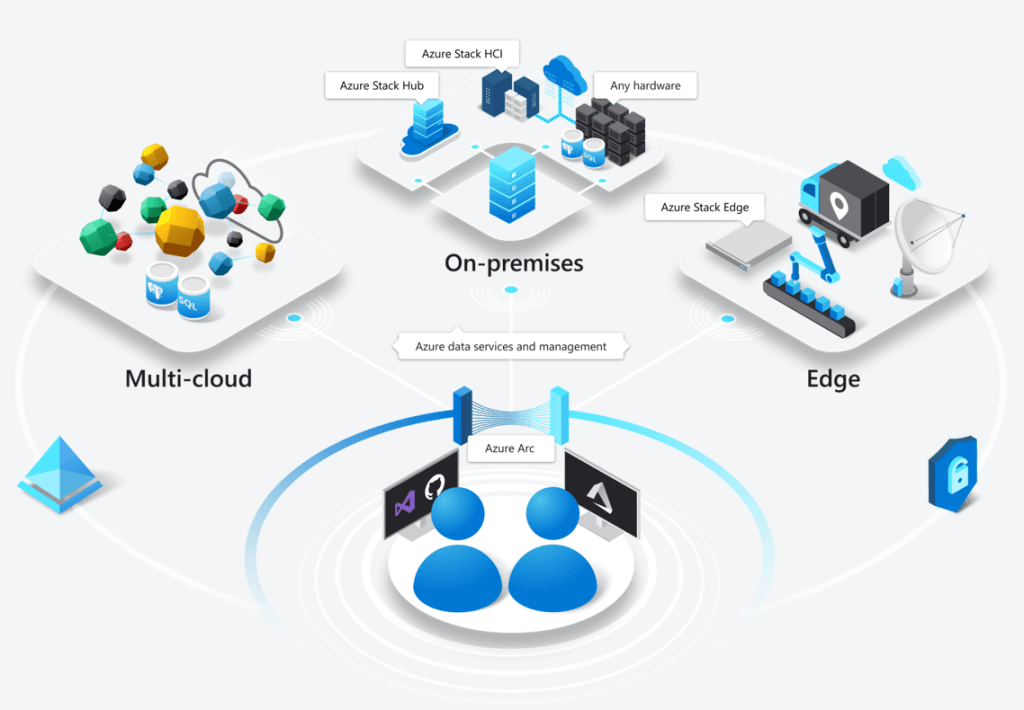
Microsoft Arc has been announced at Microsoft Ignite and it looks like it could be quite the game changer. Microsoft say that it “enables deployment of Azure services anywhere and extends Azure management to any infrastructure” across “across on-premises, edge and multicloud”.

The concept is pretty clever – it will allow certain Azure services to run in a variety of places, including on-premises hardware – both Azure Stack and seemingly regular customer hardware – but also other clouds like Amazon AWS and Google Cloud Platform!

Taken from https://azure.microsoft.com/en-us/services/azure-arc/

Multi-cloud is the concept of an organisation having multiple public clouds (Azure, AWS, GCP etc.) in use at the same time and, while many say it isn’t necessary – and even more say it isn’t a good idea – it’s already reality for many companies around the world. That being the case, anything to help make it easier and more secure to manage is a positive for customers…but I’m really intrigued to see what Amazon and Google make of this! What measures will they put in place to prevent or discourage customers from using Azure Arc within their datacentres?

Microsoft are talking about “Azure data services anywhere”, which looks to be based on a Kubernetes container platform. Some of the benefits Microsoft tout include:

  • Unified Management
  • Consistent cloud billing model
  • Consistent governance
  • Unique security tools like Azure Threat Protection

Currently Azure SQL Database and Azure Database for PostgreSQL Hyperscale are available for private preview on Azure Arc – although this Microsoft site:

https://azure.microsoft.com/en-us/services/azure-arc/hybrid-data-services/

only talks about them being available on-premises. It does however mention that SQL Server customers will be able to “leverage their existing licensing investments” to use SQL on Azure Arc, which suggests a future widening of the Azure Hybrid Benefits available through Software Assurance.

This is definitely one to keep an eye on over the next few months as it goes through private preview, then public preview, and finally out into general availability.

Microsoft Endpoint Manager


Photo by Pixabay on Pexels.com

It’s Microsoft Ignite 2019 and they’ve have announced Microsoft Endpoint Manager – the next generation of their desktop and endpoint management strategy. It brings together the various disparate elements including:

  • System Center Config Manager (SCCM)
  • Intune
  • Device Management Admin Center
  • Desktop Analytics

It will be interesting to see if other desktop related elements come under here too, in time.

As part of this, Microsoft are making Intune licenses available free of charge to all SCCM licensed customers – to manage Windows devices. If you want to manage non-Windows devices, paid licenses will still be required.

See more from Microsoft here – https://www.microsoft.com/en-us/microsoft-365/blog/2019/11/04/use-the-power-of-cloud-intelligence-to-simplify-and-accelerate-it-and-the-move-to-a-modern-workplace/

Microsoft Product Terms: November 2019


Photo by Markus Winkler on Pexels.com

I’ve taken a look at some of the highlights of this month’s Microsoft Product Terms document.

Big news is SQL Server 2019 is here – with a new SKU type and expanded fail-over rights.

We now have “SQL Server Big Data Node (BDN)” – available in 2-core packs via EA & EES. Requires a “master node” of SQL Std/Ent core with SA and includes certain SA rights.

Each SQL Server Ent Core license with SA gives 8 BDN licenses and each SQL Server Std Core license with SA gives 1 BDN license, when assigned to a “master node”.

The updated fail-over info is there too, but I’ll look at that properly in a separate article.

New language that M365 & O365 F1 licenses can only be assigned to users without a dedicated device.

“A Dedicated Device is a computing device used for work with a 10.1” screen or larger, used by the user more than 60% of the user’s total work time during any 90-day period”

F1 licenses are aimed at users who tend not have a device – drivers, nurses, warehouse staff etc. but I know some organisations are looking at them as a way to license traditional office workers and reduce costs. This new language looks to prevent that.

The new Project Plan 1, 3, and 5 licenses are added – only available via CSP. Plan 1 not available in France or South Korea for some reason. 🤔

Terms have been added to cover Azure Spot offers. <– Interestingly, I haven’t seen Microsoft use this term themselves until now. They have referred to them as “low-priority VMs” in Azure, with Spot being a term used by Amazon AWS.