Microsoft Teams gets External Access


Microsoft Teams – their answer to Slack – has been well received by many organisations in the 6 months since its release, but one thing that keeps popping up is the inability to work with external users.

Well today, September 11 2017, that changes. Microsoft have announced the rollout of guest access. This means companies can now have external partners/consultants/customers etc. to be part of a team, participate in chats, view files and more.

From a technical perspective, this is managed via Azure AD B2B Collaboration, giving the ability to detect suspicious activity, apply conditional access policies and multi-factor authentication.

This feature should really help drive the adoption of Microsoft Teams, both within organisations currently using it internally and also to a host of new customers too.

The Microsoft blogpost is here.

Microsoft rename Office 365 Skype for Business components


Ignite is Microsoft’s upcoming technical focused event, and one of the session abstracts shows that Microsoft are renaming some of the Skype components within Office 365.

Cloud PBX = Phone System

PSTN Calling = Calling Plan

See the session info here

Photo by Ron Lach on Pexels.com

Windows Server 2016 – Nano Server


What is Nano Server?

A new way of deploying Windows Server introduced with the 2016 release, Nano Server was, in Microsoft’s words:

A deeply refactored version of Windows Server, …designed to give you the lightest and fastest server OS configuration with fewer patch and update events, faster restarts, better resource utilization and tighter security.

With a greatly reduced footprint, it makes deployment faster and also presents a much smaller area for attackers to focus on.

Nano Server footprint.png

Microsoft gave some examples of where Nano Server would be a great fit:

…it’s particularly useful for clustered Hyper-V, clustered storage and core networking services scenarios; or as an application platform it’s highly optimized for modern distributed and cloud-based apps which leverage containers and micro service architectures

We can see it was aimed at making server infrastructure easier to manage, more secure and more agile. Using the Current Branch for Business/Semi-Annual Channel update model means Nano Server receives new features and updates on a regular basis. This means active Software Assurance (on both Windows Server server licenses AND CALs) is a requirement to run this deployment model.

What’s changed?

In June 2017, Microsoft have said that, from the next release, Nano Server will be for running containers ONLY.

As part of this effort to focus on containers, we will be removing the functionality for infrastructure-related roles.

For organisations looking to deploy smaller Windows Server instances for infrastructure related roles, the recommendation is to now use the Windows Server Core installation option.

Organisations currently running Nano Server for non-container functions such as IIS, Storage hosts etc. will need to understand how this affects them.

  • How many machines will be impacted?
  • Where are they?
  • What are they running?
  • When will they need to move to the next release of Windows Server – bearing in mind they are on the regular semi-annual cadence?
  • How much time and effort is required in switching from Nano Server to Server Core?

As always, I’m interested to hear your views. Will this make a big impact within your organisation? Do you already use Nano Server? Will this focus on Containers change that?

Further reading

Microsoft articles:

Exploring Nano Server

Delivering Continuous Improvements

Windows Server 2016 new update model


Microsoft have recently announced a couple of upcoming changes to Windows Server 2016.

The first relates to the Windows Server 2016 update schedule:

Semi-annual Channel

Those of you working with Windows 10 or Office 365 may well be familiar with this term and concept already. This is Microsoft’s “Cloud Cadence”, giving feature updates twice a year – with each release being supported for 18 months from release.

As these updates bring new features, they are classed as new versions so it’s perhaps not surprising that:

Servers without Software Assurance do not have rights to the Semi-annual Channel releases

To access this new update schedule, customers must have Software Assurance on their Windows Server Standard or Datacenter licenses.

Long Term Servicing Channel (LTSC)

For situations where such regular updates won’t work, there is the Long Term Servicing Channel which is effectively Windows Server with the same release & support schedule we’re all used to:

5 years mainstream support + 5 years extended support

and of course the option for a further 6 years with the purchase of Premium Assurance.

What does it look like?

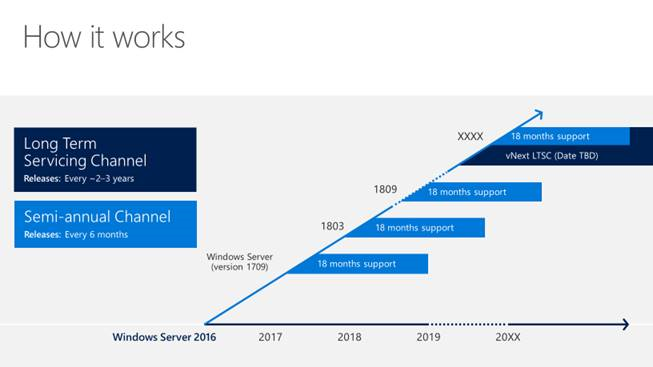
This diagram from this Microsoft article gives a good visual representation of how the update schedule will work:

WS Channel

Organisations will have the option to skip a release and wait until the next release before upgrading.

The naming convention, as you can see above, will follow that of Windows 10, System Center etc. using the year and month. This means a new Windows Server release in March 2018 will be 1803 for example.

What does this mean?

It will be interesting to see how many organisations will move their server infrastructure to what is quite a rapid update schedule, particularly where they need to remain in step with support for 3rd party applications.

I’m intrigued to hear people’s thoughts on this. Do you see this being used within your organisation? What positives/negatives do you think this will bring?

Further Reading

Microsoft Articles:

Delivering continuous innovation with windows server

Semi Annual Channel overview

Things I DIDN’T see at Microsoft Inspire 2017


There were LOADS of announcements and updates at Microsoft Inspire but equally, there were some things that weren’t mentioned very much, or even at all. This is a run down of the things I noticed by their absence and I’d love to hear your thoughts. If you DID hear about some of these things, then please let me know!

Azure Stack

Much talked about for the last couple of years has been Azure Stack. The next iteration of Hybrid Cloud, it allows organisations to run Microsoft Azure services within their own datacentre. In the weeks leading up to MS Inspire 2017, information around the licensing models and costs was released online. I was VERY excited (which to be fair isn’t that unusual) but I also saw a fair amount of interest from partners and end users, across Twitter and LinkedIn.

I thought we’d be seeing plenty of talk about Azure Stack in the Inspire keynotes but, unless I missed something, it wasn’t mentioned at all. There were a few sessions being run by the Azure Stack hardware vendors such as Dell EMC and one licensing related session, but that was it.

Workplace Analytics

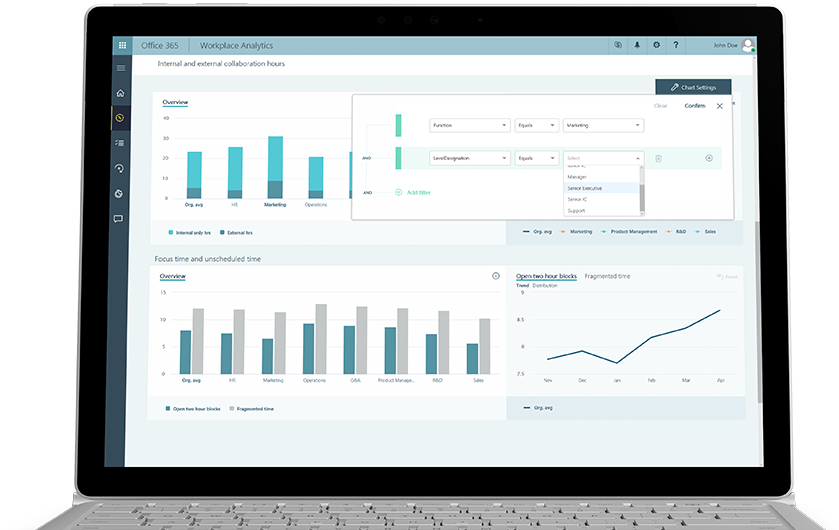
A little before Inspire, Microsoft started to release information about Workplace Analytics, which uses Office 365 data to help:

business leaders understand collaboration patterns across organizations that influence productivity and employee engagement

Workplace Analytics

With its aim of making collaboration more fruitful and efficient, and to help with hiring staff and building teams, it seems like it could be a key product for many organisations. I expected to see talk of this in one of the keynote sessions but again, it didn’t appear to get a mention. I also didn’t see any sessions talking about Workplace Analytics.

Perhaps it was felt that the the product didn’t fully fit with the messaging around the four solution areas of:

  • Modern Workplace
  • Business Applications
  • Applications & Infrastructure
  • Data & Artificial Intelligence

Whatever the reason, I was surprised not to hear more about it.

Windows 10 Mobile

This one didn’t surprise me to be honest. While it’s clear that Microsoft are still very much working towards the “Cloud First, Mobile First” mantra – it’s also become clear that a mobile phone OS isn’t high up on the list…if it’s on the list at all!

There were lot of sessions aimed at the mobile world. Sessions on building apps with Xamarin, managing mobile devices with EMS and how BlockChain can integrate with the mobile world were all on show…but nothing specifically on the Windows mobile OS.

Conclusion

Microsoft have so many products and threads to their business, and Inspire is a relatively short amount of time in which to get important messages across, that – of course – not everything can be covered in huge detail. However, these 3 stuck out as quite conspicuous by their absence.

Were there products or topics that you thought were under represented? What are your thoughts on the above?


New apps added to Office 365 Business Premium


Microsoft are adding a range of new apps to Office 365 Business Premium – and by extension – to the newly announced Microsoft 365 Business (more on this in another post). These are:

Microsoft Connections

This Mailchimp-esque tool is designed to help organisations create email marketing campaigns with a host of templates for different scenarios.

Connections.jpg

It also features many of the key metrics needed to track the success of an email campaign, such as:

  • Open rate
  • Clicks
  • Sign ups
  • Unsubscribes

and more. Connections will be available via the web and also Android & iOS apps.

Microsoft Listings

This tool helps business manage their business information across a range of key sites including Facebook, Google and Bing.

Listings

Updating once in Microsoft listings will push the changes out to the various platforms and the web dashboard will also give a single place to see page views and reviews.

Microsoft Invoicing

Another tool aimed at making business easier for smaller organisations, this tool helps create and track invoices and also connects with PayPal and QuickBooks for added functionality. Invoicing can be accessed via the web and Android & iOS apps.

Invoicing

Microsoft Business Center

This is a web based, unified dashboard for the newly added apps – giving organisations one place to see their outstanding invoices, the success of their email campaigns, their online standing and more.

Business Centre

Availability

These are currently rolling out in Preview to users in US, Canada & UK, starting with those set to “First Release”.

MileIQ

Microsoft purchased MileIQ in 2015, and a now adding it into Office 365 Business Premium. The iOS/Android app is used for mileage logging, when using a personal car for business purposes, and making it easier to claim back the expenses.

Microsoft’s aim

These new additions are aimed at making things easier for smaller businesses and, as Microsoft say, to make Office 365 Business Premium “more valuable for your small business”. Microsoft are looking to move this far beyond “hosted email” and for organisations to see Office 365 as an integral tool across multiple parts of their business – helping them win new business and reduce costs at the same time.

Adding new features and increased value is a key aspect of success for vendors in the new, SAAS world as every year, customers have the option to choose to leave. As a manufacturer, if your product isn’t giving your customers what they want, it is now often easier for them to move to a competitor than ever before.

Further Reading

https://blogs.office.com/en-us/2017/07/10/new-business-apps-in-office-365-business-premium-help-you-run-and-grow-your-small-business/

https://www.microsoft.com/en-us/microsoft-365/business

Microsoft 365


What

First we had Enterprise Cloud Suite (ECS) and then we had Secure Productive Enterprise (SPE)…now we have Microsoft 365.

As with the previous iterations, Microsoft 365 is a single SKU that combines:

  • Windows 10 Enterprise
  • Office 365
  • Enterprise Mobility + Security (EMS)

but Microsoft 365 does bring a change: there are now 2 versions – Enterprise & Business.

Enterprise

Aimed, not surprisingly, at larger organisations, Microsoft 365 Enterprise comes in 2 flavours: E3 and E5 – where each includes the components of the same level.

Business

This is a combination of:

  • Windows 10 Pro
  • Office 365 Business Premium
  • Enterprise Mobility + Security (EMS)

and features some new tools such as Microsoft AutoPilot and the ability to automatically deploy Office apps to Windows 10 PCs.