Office 2010 Components


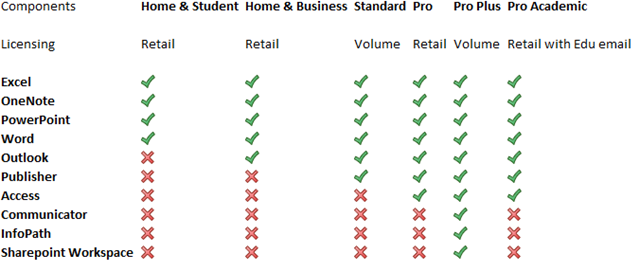
Office 2010 has hit RTM (Release To Manufacturing) and is just about to start making itself available to users in it’s final version. Most people are aware that there have been some changes with what is included in which Office editions but I don’t think I’ve seen a full breakdown yet, so here you are 🙂

image

A couple of major changes are:

No more Office Enterprise

New Pro Academic Option

and one that is quite big but isn’t really getting mentioned:

OneNote is now in ALL versions of Microsoft Office 2010 (except Starter); previously it appeared in just the Enterprise SKU. OneNote is a great application (What is OneNote?) and this will help increase it’s adoption among home users and also within Corporate Environments.

You can see more on Technet here.

Windows Azure: Free Developers Course


Windows Azure is a key part of Microsoft’s “Cloud” strategy moving into the future but of course, it needs people to use it and develop for it for it to be truly successful. They are piloting a new way of training developers & architects Azure, via self paced, web based training…best of all it’s FREE!

The method is one that I’m quite familiar with which aims to offer the best features of classroom training without the hassles and expense of travel, hotels, being out of the office for days etc. It utilises:

  • Interactive Live Meeting sessions with a tutor
  • On-line videos
  • Hands on Labs
  • E-Learning
  • Weekly Assessments

to cover off the topics, and you don’t need to go anywhere! The course lasts for 6 weeks from:

May 10th – June 18th

and covers:

Week 1 – Windows Azure Platform
Week 2 – Windows Azure Storage
Week 3 – Windows Azure Deep Dive and Codename "Dallas"
Week 4 – SQL Azure
Week 5 – Windows Azure Platform AppFabric Access Control
Week 6 – Windows Azure Platform AppFabric Service Bus

and did I mention it’s FREE?!

This is aimed at developers, architects, programmers and system designers and recommends at least 6 months experience programming in .NET and Visual Studio.

It will take around 4 to 5 hours a week to research and complete the tasks and there are timelines etc for submitting the work. However, successful completion gets you a “Microsoft Certificate of Completion” 🙂

This is a new approach from Microsoft and one that I hope will be expanded out to other product areas.

Register:

You can find more information and sign up here:

https://msevents.microsoft.com/CUI/EventDetail.aspx?EventID=1032449971&Culture=en-GB

If you’re technically minded and interested in Azure, sign up…and get any colleagues/friends that would be interested to sign up too!

I’ve registered and am looking forward to it so hopefully I’ll see you there 🙂

Windows Intune


Windows Intune is the newest addition to the Microsoft Online Services stable…and it’s a biggie! Do you remember System Center Online Desktop Manager (SCODM)? Did you notice that it all went quiet on that front? Well here it is with a new name…

What is it?

Windows Intune is a cloud based, central management system aimed at SMB’s of up to 250 machines (or so).

“Windows Intune simplifies how businesses manage and secure PCs using Windows cloud services and Windows 7—so your computers and users can operate at peak performance, from virtually anywhere.”

Intune covers many of the areas that IT Managers find difficult and time consuming such as:

  • Managing Updates
  • Pro-active monitoring
  • Malware Protection
  • Asset Tracking (Hardware & Software)
  • Remote Assistance
  • Setting Security Policies

Windows Intune screenshot

Extra Features:

It’s not just great central systems management that Intune gives you also get:

Software Assurance: Subscribing to InTune allows you to upgrade all your machines to Windows 7 Enterprise and take advantage of features including:

    • Bit Locker to Go
    • Federated Search
    • Direct Access
    • and more

You also receive

“new features or updates to Windows Intune or the Windows operating system automatically as long as your subscription is active”

so say “Hello” to Windows 8 further down the line 🙂

Despite this, you can run Vista, or even XP, as your corporate desktop OS.

MDOP: The Microsoft Desktop Optimization Pack is a great set of tools including MED-V & App-V that make managing your environment easier and more cost effective. See more info here. The Asset Inventory Service (AIS) component of MDOP is already included as part of InTune.

How can I get it?

It’s currently in beta, limited to 1000 customers in US, Canada, Mexico & Puerto Rico. If one of those is you locale, go sign up here:

http://www.microsoft.com/online/windows-intune.mspx


Relation to existing Products.

Microsoft have had on-site management products for years. First SMS & MOM and now the System Center family such as:

  • SCCM (System Center Configuration Manager)
  • SCOM (System Center Operations Manager)
  • SCE (System Center Essentials)

These products are becoming more and more popular among both corporate customers and the education sector, and have been marked by Steve Ballmer as an area of big focus for the coming years. Microsoft have also put a lot of effort into their Online Services but could still do with a real killer product to help those small to medium businesses (SMB’s) fully embrace “The Cloud”. Thus it make sense that they’ve combined the 2 and created InTune.

My thoughts are all around how InTune will sit alongside products and offering that already exist. It is very much an online version of System Center Essentials, although InTune can’t do Application Deployment and SCE doesn’t include any ForeFront Protection. A breakdown is below:

image

However I do think that it could cause a lot of confusion when it comes to Software Assurance. As a Channel Licensing Specialist I, and my company, have done a lot of work around Software Assurance – especially as it relates to Windows 7. It seems to me that InTune may well undermine a lot of the work we (and other partners) have done in this area to show the whole range of benefits that SA offers…many of which aren’t included with the new offering.

It will also muddy the waters when it comes to purchasing Windows 7 & SA now. InTune is slated to be available in many more countries with 12 months of the beta; so companies considering Software Assurance within the next 6-12 months (say) may now push the projects back in order to evaluate InTune. Not great for partners or the channel.

Conclusion

As a product, I think InTune is great. I’m a big of BPOS (as a concept, although it hasn’t reached its potential yet) and adding management tools to the Suite is really good way of both bolstering the Online offering and helping more people reap the benefits of Microsoft’s management expertise.

I am however, more cautious about it’s effect on the perception of SA and project timelines over the coming 12 to 18 months.

To find out more about Windows InTune, go here:

http://www.microsoft.com/windows/windowsintune/default.aspx

Links


I do like it when my blog is linked to by others and this last week I’ve had a few really good links, which is nice 🙂

These are:

Mary Jo Foley over on ZDNet linking to my post on VLSC 3.5

4sysops linking to my post on VLSC 3.5

CRN (Channel Reseller News) linking to my post on VLSC 3.5

So something of a theme 😉

Thanks to everyone who reads this blog, and thanks to everyone who links to it 🙂

Windows 7 Deployment Learning Portal


Windows 7 deployment is definitely a hot topic. The larger/more technically minded end end users are looking to get their IT teams skilled up and more Microsoft partners than ever before are looking to acquire these skills, and offer the services. Add into this the number of consultants and techie home users and there’s a real appetite for information across the board.

Microsoft have already made a lot of great information available via Technet as well as the MS Press books etc. For me, although Technet is great, I do sometimes struggle to find what I need for a certain situation/question and end up none the wiser. I also like online exams as a way of testing/tracking my level of knowledge, and also my (hopeful) improvements. Thus, I got pretty excited (more excited than a Rydberg atom in fact :-)) when I discovered the

Windows 7 Deployment Learning Portal

It’s aim is

“to help you identify the strengths and gaps in your knowledge around Windows 7 deployment and provide some targeted learning to help you reach the top of your game”

and, in my opinion, it does just that…and very well too. Going through the 11 modules showed me there were a few areas that I was already quite strong in as well as a number of modules I needed to work on. <—This is where the targeted Technet materials came in very handy. Rather than leaving me to my own devices, after each question I answered incorrectly there were a few links to specific Technet pages relating to the topic in hand; I was able to quickly read up on the subject, identify my mistakes, find the right answer and then re-take the module.

image

image

Learning Style

I really like the way that Microsoft Technet have approached this site. It’s much more about identifying, and then filling, any knowledge gaps you may have rather than simply passing/failing an assessment; this is a much better approach for all involved.

I failed a few of the modules and hugely benefitted from being able to read through the Technet articles straight away, and then re-take the modules. Once I’d read through the various suggested articles including how to guides/step by step procedures etc, I passed each module but, more importantly, retained the knowledge. If it had simply said “You’ve failed”, I wouldn’t have improved my skill levels anywhere near as much.

For anyone looking to become more au fait with Windows  deployment methods, be it for personal interest or work necessity, this site is a great place to start. Equally, if you’re looking (as I am) to complete the Windows 7 70-680 exam, there is a wealth of information available through this site and I would definitely recommend it! On the subject of the 70-690 exam, Microsoft are running an:

Early Bird Promotion

“The first 150 individuals to pass all modules will receive a free Microsoft Press Microsoft Certified IT Professional (MCITP) self-study guide. The first 500 individuals to pass all modules will receive a free certification exam voucher.”

I have no idea if it’s still within the 150 pass limit (or the 500 for that matter) but if I was you, I’d head over to:

http://technet.microsoft.com/en-gb/windows/ff470986.aspx

get registered and get taking those modules. Worst case you get a great, solid grounding in Windows 7 Deployment tactics and best case you’ll get some great free gifts 🙂 Friendly word of advice, make sure you select the “I want to be included” tick otherwise you won’t be eligible for the free book or voucher 😉

I hope you have fun over there and I just want to say, Thank You Microsoft Technet, for a great resource 🙂

Microsoft to end Itanium Support


Microsoft have announced that the next versions of a number of their products will cease to support Itanium processors; making:

Windows Server 2008 R2
SQL Server 2008 R2
Visual Studio 2010

the last to support the Itanium architecture.

The reasoning behind this is that 64-bit processors & servers are now so hugely scalable that Itanium, as a solution for massive data-centers/high performance clusters etc, is simply no longer needed.
With both Intel & AMD releasing 6/8 core CPU’s and a servers with 8+ processors being offered by a dozen manufacturers, 64+ core boxes are available & close to becoming common. Windows Server can handle 256 logical CPU’s and so is perfectly placed to look after the datacenter.

Support
Itanium users need not worry though, Windows Server 2008 R2 is fully supported until July 9th 2013, then going into extended support until July 10th 2018; so Microsoft aren’t abandoning anyone!

See the full post here:

blogs.technet.com/windowsserver/archive/2010/04/02/windows-server-2008-r2-to-phase-out-itanium.aspx

Microsoft Volume Licensing Service Center (VLSC) 3.5


The change to VLSC (from eOpen & MVLS) in December 2009 didn’t go as smoothly as anyone hoped, with a couple of weeks of downtime, various issues and ongoing user confusion over the last 4 months. You can see the full run down of issues, as well as partner and customer comments here:

Read Microsoft Volume Licensing Service Centre (VLSC)

but this post is to cover the changes that are coming in April 2010 with VLSC 3.5.

Current VLSC

I’ve used the VLSC a number of times from the viewpoint of both a partner, and a customer and one of the biggest problems is the new layout. The location of menu options isn’t always particularly intuitive, leading to a lot of “random clicking” and menu surfing; clearly not what anyone wants. This has led to a lot of frustrated customers, angry that things are more difficult than they used to be, especially as most customers don’t enjoy licence management anyway!

Feedback

Microsoft ran a series of feedback sessions with customers and partners via Live Meeting, Phone interviews etc to see what problems people were experiencing and how they would change it.

I took part in one of the usability scenario Live Meetings, which involved me performing various tasks in VLSC while the Softies observed (Live Meeting Share Desktop feature FTW!). There were a few instances where, even though I’d done it before, I couldn’t remember where certain functions were and resorted to clicking through all the menus! I felt that the people in the meeting really were listening to what I said and that they really valued my feedback…the fact that a couple of the changes I suggested have now been implemented show this to be true 🙂

VLSC 3.5

VLSC 3.5 is being rolled out this month (April 2010) with a number of changes, facelifts and new features including:

Improved Navigation Bar:

The 2 main things customers need/want to do in VLSC are:

Download product media

Access licence keys

Under the old menu, it isn’t 100% clear where these are located but the new VLSC gives 2 new menu choices, just for these actions.

Improved Key Management:

There are a number of changes and improvements being made here with 2 of the biggest being:

Enabling customers to download all their VLK’s (Volume Licence Keys) to a local file, giving them easy offline access to all their keys. This will be a huge benefit to just about everyone 🙂

Providing the ability to see VLK’s relating to a specific licence ID. When companies have dozens of agreements, it can often be useful to see which keys relate specifically to which ID’s…and thus perhaps to which orders.

Manage on Behalf of:

This is a great change for Partners. Often we’ll get customers who don’t want to be involved with the day to day management of VLSC and so they ask us to “look after it” for them.

The new “Add Open Licence” feature gives non-administrative rights to the agreement, enabling partners to:

  • Download media
  • View VLK’s
  • Manage SA benefits

and more.

You can see the whole range of changes and more information over on Eric Ligman’s blog here:

http://blogs.msdn.com/mssmallbiz/archive/2010/03/29/announcing-microsoft-vlsc-3-5-with-add-open-license-coming-in-april.aspx

Although the initial launch of VLSC was something of an issue, Microsoft have done a great job of asking the right questions of the right people, listening to their feedback and implementing it in a timely manner. It’s great to seem them listening to customers and partners and taking action on what we say… 🙂

If you’ve had issues with the VLSC I’d love to hear what you think of these new changes…especially if you commented on my original VLSC post in December.

Will they make your life easier, are there any changes you’d still like to see?

Windows Phone 7


Not often is the end of a series welcomed by all, especially when it hasn’t even started yet…but this is different. Microsoft’s upcoming mobile OS is now officially titled:
“Windows Phone 7”
The previous name was a bit of a mouthful and I don’t think I’ve ever heard anyone use the whole title anyway, so it seems like a good move to me…the reaction on Twitter has been positive so far too
Now we just need it to be released…and be better than Android 😉